Financial Modelling Fundamental using Excel
🚀 Bootcamp Online – Terbatas
Building Financial Models with Claude AI
📅 24–27 Agustus 2026 | 🕖 19.00–21.00 WIB | 💻 Zoom Workplace
💰 HTM: Rp 1.950.000 · Early Bird Rp 1.755.000 s/d 20 Juli 2026
Course Objectives
Upon the completion of this Financial Modelling Fundamental using Excel course, participants should be able to:
- understand the difference between a financial model and a spreadsheet
- understand various types and purposes of financial models
- understand the skills to acquire to be a good financial modeller
- understand and apply financial modelling best practices
- use Excel functions, features, and objects frequently used in financial modelling
- use Excel keyboard shortcuts
- build a 3-way financial projection model (income statement, balance sheet, cash flow statement) and financial ratios
- build a dynamic chart for financial ratios
- build sensitivity and scenario analysis functionality
- build model error checks to maintain financial model integrity
- build model navigation for ease of model use
Baca Juga: Building Financial Models with Claude AI
Workshop Trainer
Purwadi Nitimidjojo
The trainer, started his financial modelling career in early 2005 after working for Indonesian Bank Restructuring Agency (IBRA / BPPN) during the monetary crisis from 1998 through 2004. At IBRA’s Credit Risk Management Division he developed various financial models for debt restructuring and corporate restructuring and learned that most of IBRA’s large debtors hired foreign financial consultants to develop financial models as they didn’t have any resources who could develop proper financial models, and financial modelling training courses were not available back then. This is when he saw an opportunity to deliver financial modelling training courses and develop best-practice financial models for clients in various industries in Jakarta.
In early 2005 Purwadi teamed up with two of his friends and used “Edward, Farral & Peterson” and “Edward & Peterson” as their brands to provide monthly public training courses and financial modelling services until early 2012 before he was hired by Deloitte Financial Advisory as a Financial Modelling Director to do the same. At Deloitte he and his financial modelling team developed best-practice financial models for his clients in various industries for various purposes and delivered monthly financial modelling and Power BI training courses for the public, clients, and Deloitte’s internal staff in Indonesia, Singapore, Malaysia, Thailand, and Cambodia.
After spending 10 years working for Deloitte, he returned to his own financial modelling business and is now working as a financial modelling subcontractor for BDO and Deloitte as well as an independent private financial modelling consultant and trainer.
Baca Juga: Data Analysis & Visualization with Power BI
Schedule
- 26-27 Januari 2026
- 19-20 Februari 2026
- 26-27 Maret 2026
- 20-21 April 2026
- 21-22 Mei 2026
- 22-23 Juni 2026
- 20-21 Juli 2026
- 20-21 Agustus 2026
- 17-18 September 2026
- 19-20 Oktober 2026
- 16-17 Novermber 2026
- 14-15 Desember 2026
Venue
Yogyakarta:
- NEO Hotel Malioboro Yogyakarta
- Royal Malioboro by ASTON Yogyakarta
- Novotel Suites Yogyakarta Malioboro
Jakarta:
- Swiss-Belinn Simatupang, Jakarta Selatan
- Swiss-Belhotel Pondok Indah, Jakarta Selatan
- Ibis Styles Simatupang, Cilandak, Jakarta Selatan
(Kepastian venue akan dikonfirmasikan H-4 sebelum event)
Investment Fee
Yogyakarta: IDR 6,950,000/ Peserta
Jakarta: IDR 5,490,000/ Peserta
On-line Class (Zoom Workplace): IDR 3,450,000/ Peserta
- Harga sudah termasuk Training Material, USB, Sertifikat, Lunch & Coffee Break, Souvenir, Door Prize.
- Discount 10% bagi peserta yang mendaftar lebih dari 1 participants dan pembayaran dilakukan sebelum event berlangsung.
- In-House Training: minimal 4 Peserta.
- On-Line Class: minimal 2 Peserta.
Baca Juga: Prompt Engineering Best Practices for Financial Modeling using Claude AI
Course Outline
- What is Financial Modelling?
- Financial Model vs. Spreadsheet
- Types and Purposes of Financial Models
- What Skills Do You Need To Be a Good Financial Modeler?
- Financial Modelling Best Practices
- Workbook Structure
- Sheet Structure
- Formats & Styles
- Assumptions
- Sensitivities & Scenarios
- Outputs & Presentations
- Calculation Formulas
- Naming Principles
- Time Series
- Error Checks
- Excel Skills – Model Building Toolbox
- Excel Functions, Features, and Objects Frequently Used in Financial Modelling
- Keyboard Shortcuts
- Modelling Financial Statement Inputs
- Opening Balance Sheet and Projection Assumptions
- Modelling Calculations
- Revenue
- Cost of Goods Sold & Operating Expense
- Working Capital
- Capital Expenditure & Fixed Assets
- Debt & Equity
- Corporate Taxation
- Other Financial Statement Items
- Modelling Financial Statement Outputs
- Income Statement, Balance Sheet, Cash Flow Statement
- Modelling Financial Ratios
- DuPont Formula
- Profitability
- Asset Efficiency
- Liquidity
- Leverage
- Debt Service Coverage
- Building a Dynamic Chart for Financial Ratios
- Modelling Sensitivity and Scenario Analysis
- What is Sensitivity Analysis?
- What is Scenario Analysis?
- Modelling Functionality for Sensitivity and Scenario Analysis
- Modelling Error Checks and Easy Navigation
- Q & A Session
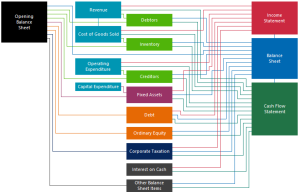
Financial Model Core Components
Baca Juga: Financial Modeling Data Process, Analysis & Visualization
Frequently Asked Questions
- Who Should Attend This 2-Day Fully Hands-On Course?
- This course is designed for beginners or those who need to refresh their financial modelling skills.
- What are the Prerequisites for Participants?
- Participants are expected to have accounting & finance knowledge and be familiar with basic Excel functions and features.
- How is the Course Delivered?
- In-house or in public; live (in-person) only.
- How Many Hours per Day Does It Last?
- The course duration is 8 hours per day, usually from 9.00 am to 5.00 pm.
- What are the Minimum and Maximum Number of Participants per Classroom If Delivered In-House?
- No minimum number, but the maximum number is 20 participants.